
This post may contain affiliate links, meaning I may earn a commission if you purchase through my links, at no additional cost to you. I only recommend products, tools, or platforms I’ve personally used, researched thoroughly, or genuinely believe could provide value.
Blogging was my “gateway drug” to making money online. I got a copywriting job editing a blog for a local RV-loving mom, and the rest was history. It’s actually really fun, and can be super profitable if you’re willing to put in the time.

Do people make money by blogging?
It should come as no surprise that there are many ways people earn money online – but blogging? The first thing a lot of people think of when they hear “blog” is basically an online diary, but if you think about it, you’re probably reading a blog almost every time you get online.
Whether you’re searching “how to make money online,” “when should I plant grass in Oklahoma,” “what’s the best time to visit Japan,” or “what moisturizer is best for acne-prone skin” – chances are you’re going to be looking at at least one or two blog posts that someone has written.
The beautiful thing about having a blog is that someone, somewhere out there will be looking for exactly what you’re writing about.
It literally doesn’t matter how obscure or random your “niche” is – you will have an audience. The bigger question is, how are you going to profit off of it?
What are the most profitable types of blogs?
Like I said, you can write a blog about absolutely anything out there and someone will want to read it. But if you’re wanting to make money off of it – which is the whole point of this blog – you need to be a bit more strategic.
The most profitable way to monetize your blog will be to start by creating content for a profitable niche. The caveat here is, everyone wants to be in a profitable niche unless they’re simply blogging for fun. So the competition may be high… but the good news is, there are approximately 6.12 billion internet users worldwide – so you’ve got a pretty well-stocked pond to fish in.
What is a niche?
Your niche is who you are; what your content revolves around; who you’re speaking to. This is the heart and soul of any online business. If you’re constantly posting about every topic under the sun with no rhyme or rhythm, your audience won’t know what to expect next – and if they’re looking to follow someone they can get to know, like, and trust (the key elements of an online buyer) they’re not going to just wait around for you to post something they’re looking for. They’ll keep scrolling.
You need to be somewhat predictable. I’m not saying write about the same exact thing over and over again, but stick to a common underlying theme. For instance, take this blog. I’m writing about blogging, network marketing, UGC, using Canva, online storefronts… those are all different topics but they all center around making money online.
My niche is moms in their 30s looking to make extra money online with a side hustle, because guess what? That’s who I am – therefore, I’m quite the expert on that topic. More people are inclined to listen to what I have to say on being a 30-something mom starting an online side hustle than a 19-year-old male in college would.
What are the most profitable blog niches?

Choosing a popular niche that is searched for often is a more reliable way to make good money blogging. Some of the most profitable niches are really pretty obvious:
- Health
- Wealth
- Relationships
- Parenting
- Food
- Pets
- Travel/outdoors
- Tech/game
- Home buying/renting/owning/renovating
- Gardening/homesteading
Obviously, these are all fairly broad categories so oftentimes, the more specific you can get within your niche, the better. There may be 7,000 blogs about “motherhood” but only 73 about “single mom raising a disabled child in Chicago.” And the more specific you can keep your content, the more likely your blog is to be found, subscribed to, and start making you money.
How do you earn money with a blog?
There are a lot of different ways you can monetize a blog. The main ways to make money with a blog include:
- Ads
- Private advertising
- Digital products
- Affiliate links
- Videos/courses
- Sponsorships
- Memberships
- Product reviews
- Email lists
- Other services (you can get creative!)
Let’s break these down…
Making money with a blog by advertising
Advertisements are one of the simplest ways you can monetize your blog, but unless you’re generating a lot of traffic I wouldn’t rely on them as the main source of income from your blog.
Some blogging platforms will give you the option for them to place ads on your blog pages. In this case, you can earn money by either:
- CPC (Cost per click): Every time a reader clicks an ad, you earn a set amount; or
- CPM (cost per mille): For every 1,000 views you’ll earn a flat rate
You can also join an ad network, like Google AdSense, Mediavine, or AdThrive. These will connect you with advertisers who may want to place ads on your blog in return for money.
Optimizing ad monetization in a blog
If you really want to maximize your income from ads, you’ll need to put in some legwork. It’s not as simple as just throwing up some paragraphs and a photo and hitting “post” – you need to create high-quality content that’s optimized for SEO. If you’re placing the ads, make sure they’re in high-visibility locations but aren’t completely ruining your aesthetic or flow. You want your readers to stay engaged and not feel like they’re being sold to after every sentence.
Private ads
You can also negotiate directly with companies, letting them place their own ads on your page for a rate that you set. You’ll need to have a solid stream of visitors and good engagement, and make sure that your content and audience match the demographics of whichever company you’re wanting to advertise.
Selling digital products in a blog
Digital products are fantastic for building up your online business. You can utilize them as freebies to start generating an email list for larger offers, but you can also sell them directly. There’s basically no limit to what kind of digital product you can offer – but again, you want to make sure it fits within your niche. If you’re offering a digital “how to potty train a puppy” guide on a blog about vegetarianism, you may not get a lot of hits…but there will be a lot of confusion.
The Golden Rule of digital products is simple: Solve a problem.

It can be any kind of problem, and any kind of product. A quiz that will match you with the colors that best complement your skin tone. An e-book that will teach you how to can vegetables straight from your garden. A course showing you how to create YouTube videos for your own channel. A library of audio files that can be used in online content. The list goes on and on… just make sure you’re offering something helpful that’s within your niche, your area of expertise, or you probably won’t get a lot of trusting buyers/subscribers.
How do I create and sell a digital product from my blog?
This is actually a lot easier than it may sound. I’ll go into this in much more detail in my “Make your own digital products” post, but here’s the basics:
- You can create virtually any type of digital product on Canva, and can get away with a free account for most things (but some things you may need to upgrade to a paid version for)
- Then list your product in an online storefront. My preferred one is Beacons since there’s a free version, but you can also use StanStore or many others.
Affiliate links
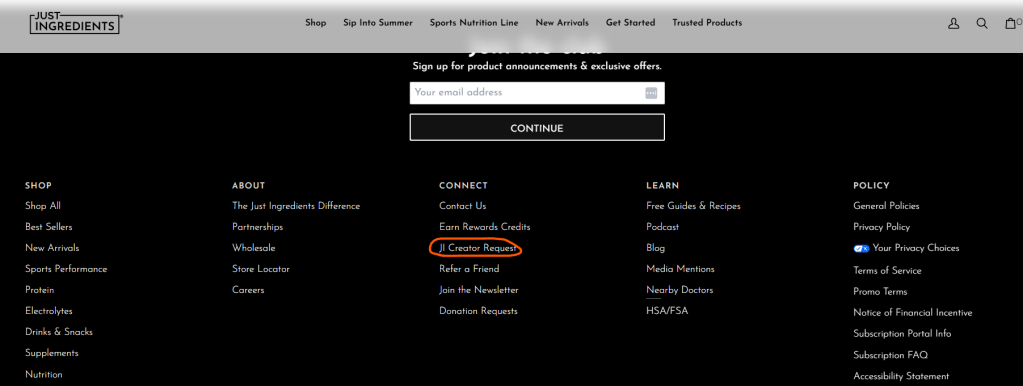
Many companies will have information on their websites that will tell you how you can apply to work with them, like these screenshots from Just Ingredients above and below.
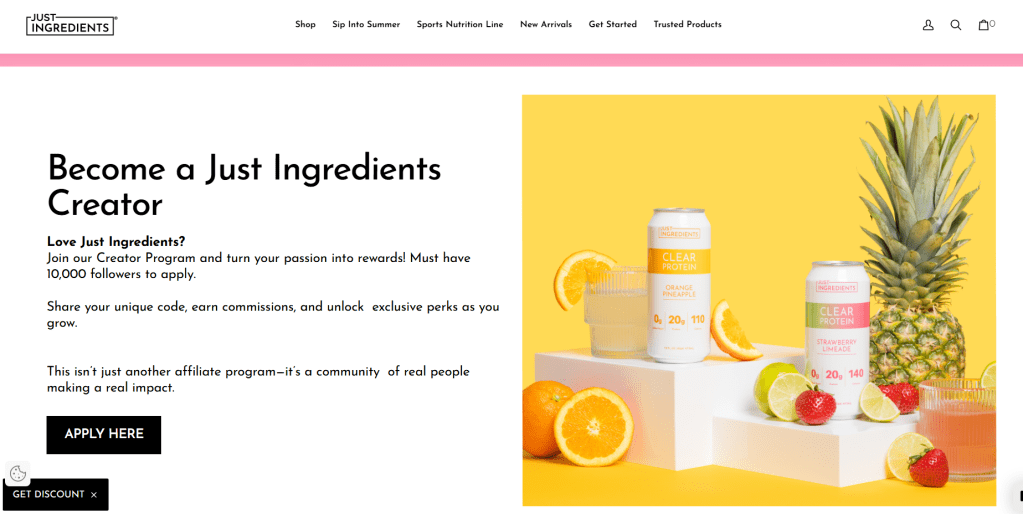
This is probably one of the easiest ways to earn money through blogging. Depending on your niche and content, you’re probably going to be talking about a lot of different products you use and love. Instead of simply mentioning them, step up your game and link them.
There are a few ways to do this, too, of course – nothing is ever simple!
The most common way would be to become an Amazon affiliate and simply share your Amazon link to products. If you’re unsure of how to join this free program, check out my post on Amazon affiliate links.
One thing to note with Amazon links is that the commissions vary depending on what products you’re sharing, but they’re often pretty small (3 to 7% is pretty average). So if you’re sharing your favorite pair of leggings that are $30 but the commission is only 3%, you’re earning $0.90. Of course, these small commissions can add up if enough people are buying it… but it can still take a lot of work, time and traffic to really make good money sharing affiliate links.
You can also get paid partnerships with brands. This is typically done by reaching out to brands via email and offering to promote their products for a fee. Then they’ll typically give you a code to give out to customers that they can enter at checkout. You’ll receive a fixed percentage (commission) of their purchase.
Keep in mind: just because you like a company and want to promote them doesn’t automatically mean they want you promoting them. They may have certain criteria you need to meet, like X amount of social media followers or a trial period to make a certain amount of sales before you’re ‘official’.
You also may be required to post on social media a certain amount per week – or have other obligations to meet – when you have a paid partnership so if you’re looking for less red tape, Amazon links are typically preferred.
Videos/courses
People come online to learn anything and everything. One of the most valuable tools you can offer are videos or courses that give detailed, visual and verbal instruction on how-to’s, step-by-step guides, online courses and modules, etc. You can also offer things like custom stock video clips for digital creators, exclusive footage or vlogs if you’re offering something like a membership… anything that gives your potential customers FOMO and leaves them wanting to spend more to get more from you.
You can create videos on YouTube or other platforms and upload them to an online store like Stan Store or Beacons where your customer can easily click, buy, and access your video content.
Depending on your blog host site, you also may have plugins available that allow you to host videos directly on your site.
Sponsorships
Similar to paid partnerships, you may find yourself being sponsored by a brand. This means you would create dedicated posts, tutorials, demos or reviews of their products or services in exchange for money.
Companies looking to sponsor are going to want you to have an engaged, trusting audience – your followers or subscribers don’t have to be huge but they do need to be engaging with you (and vice-versa). Again, make sure your niche is crystal clear and you’re looking at products or services that would benefit them.
You want your content to offer value and build trust consistently. Once you are ready to start pitching to brands, you should create a professional Media Kit that will basically act as a resume, showing your blog’s analytics (monthly traffic/views), your social media engagement rates and followers, any examples of relevant work or collaborations, and your audience demographics. Find brands of products you already know and love (NEVER sell something you haven’t personally used and liked – nobody wants to be tricked or lied to!) and send their marketing team a custom email explaining why you and your audience would be a great fit to showcase their products.
There are sponsorship networks you can join that actually help to connect bloggers with brands; you may spend a lot of time filling out profiles and “applying” but eventually you will start to get some paid opportunities.
Memberships
A membership is basically an exclusive inside-look at everything you have to offer – for a price. People can pay to get premium content or perks, like private forums, coaching, live mentorship, Q&A sessions, and more. These are typically paid for on a monthly or annual basis, so you need to make sure that your membership offering is worth the price and will leave your customers wanting to renew consistently.
Email lists
An email list in and of itself typically isn’t going to generate you any income…but it’s going to build up a group of potential buyers who like and trust you.
The best way to start building an email list is to offer a freebie or “lead magnet” – basically something that will collect e-mails from your viewers. This can be a “subscribe to our monthly newsletter” button or a “download this FREE product” (the key here is that it’s FREE). Once they enter their email to get your freebie, you have a new email to add to your list.

Your email list is a very valuable asset; you can send targeted promotions that include affiliate links to products, tantalizing proof as to why they should buy your digital products, or feature sponsored brands.
This is just another way to get your offers in front of eyes that you know are interested in the products you’re promoting (since they visited your blog AND subscribed to your lead magnet already).
How to start a blog
It’s actually very simple to start a blog, but it’s good to have an outline to follow. Here are the steps I’d recommend taking to get started if you’re a total beginner to blogging.
How to start a new blog for beginners:
Step-by-step instructions on how to start a blog
Step 1: Get old school
Grab a pen and paper and start jotting down ideas. What is your niche? What will you name your blog? What is your brand? What kinds of posts do you want to share? Who is your target audience (who are you speaking to)? How do you want to monetize? What is your aesthetic? Are you incorporating social media, digital products, other websites, etc. into your brand or will it just be the blog (at least for now)?

Write out literally everything you can and get organized so that once you start creating, you’re not winging it.
Step 2: Claim your name
Imagine this: You come up with the perfect name for your blog and it’s got a great ring to it when you add “.com” on the end. You have your aesthetic, color palette, logo, everything created and ready to go… then you find out that name has been taken.
Always check first to make sure the blog name you want is available as a domain name – this is the unique web address you will be using, like “www.yourblogrocks.com”. To make sure it’s available, first try just typing it into your search bar. If it’s available, you may get a message like “this site doesn’t exist” or “claim this site as yours now.”
If it’s not available, obviously you need to keep brainstorming. There are ways to use the name you want with a different domain extension, so you might be able to call it “www.yourblogrocks.org” instead of “.com”. If you’re good with that, great! But many bloggers like to keep it classic and obvious, ending with “.com”.
Another way to see if the name you want is available is to go straight to a registrar site like GoDaddy, Cloudflare or NameCheap – these help you find domain names or similar alternatives and purchase directly through them.
There are also some blogging platforms that will do this service for you.
Step 3: Choose a blogging platform
If you have your domain name, or even if you’re still looking, the next step will be to decide on a blogging platform. This is the host site where your blog will live. WordPress.com is kind of the “industry standard”, but there are many others. Blogger and Medium are popular alternatives. Some people like to just create a free website (which can be done easily through Wix or Squarespace) and input blog posts on there, though it’s not quite as straightforward as a site like WordPress which is designed for blogging. Another fan favorite is Substack, which easily allows you to publish simple blog articles and also sends them to your subscribers as a sort of email newsletter.
Step 4: Create your landing page & outline
Before hitting “publish,” make sure that your blog is going to be ready to receive viewers. It’s okay if you don’t have 300 posts ready-to-go; the most important thing is that new readers know what your blog is about and what they can expect. You want them to subscribe, which will keep them coming back and, hopefully, engaging with your blog.
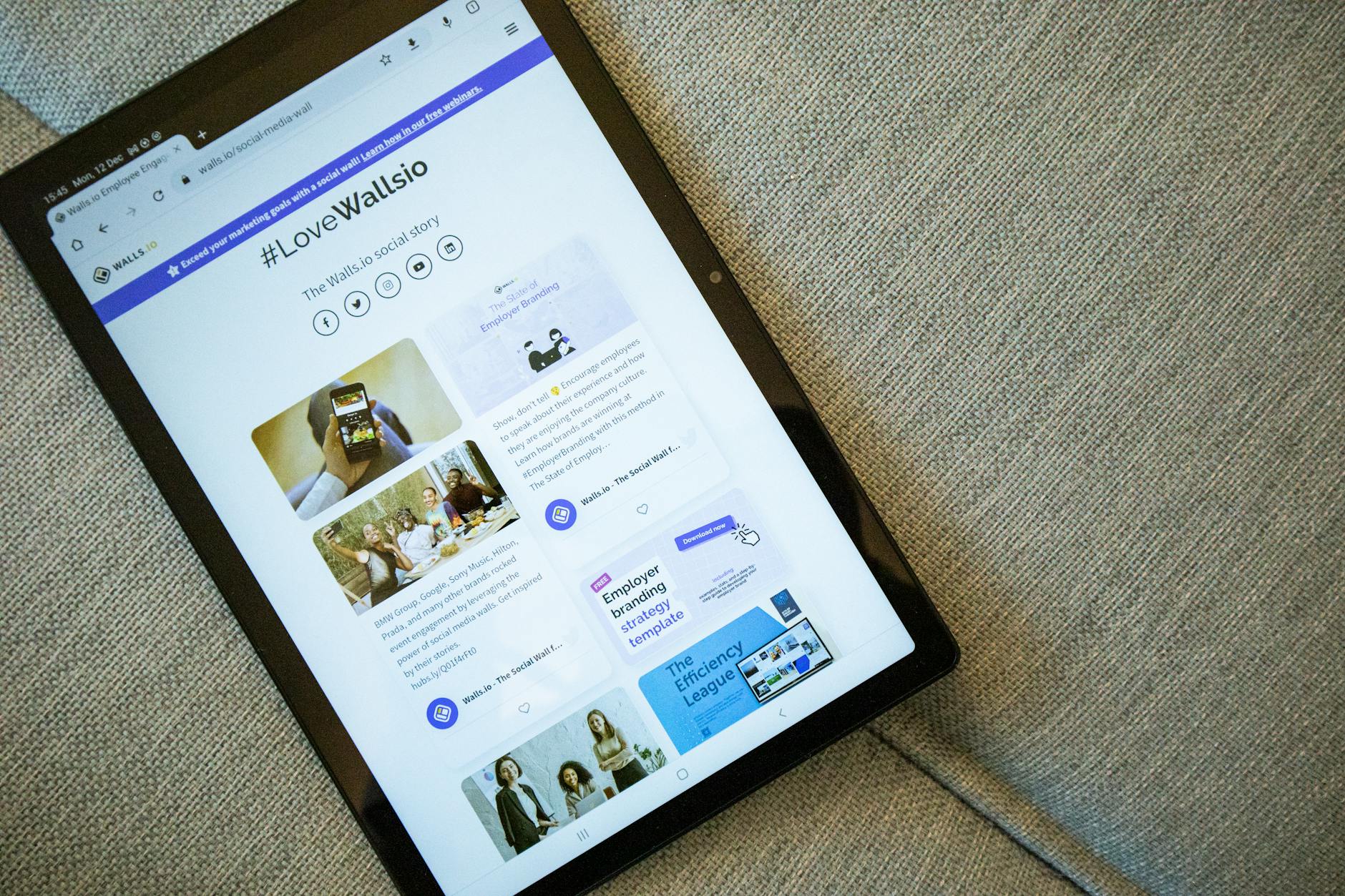
As with any social media account, engagement is key. This tells search engines that your blog is worth showing to others, which will result in more views and – hopefully – more income. Make sure you’re incorporating lots of key words and phrases, using SEO strategically, and including a lot of internal links to your other posts. This will gain and keep readers on your blog and expose them to your various offers.
Make sure your landing page (home page) is complete before you publish. It doesn’t have to be anything fancy, but just a quick ‘about you’ that tells readers you know what you’re talking about and are a credible source of information goes a long way. You should also provide a brief summary of the purpose of your blog, letting them know what kind of content, information, or resources they can expect from you.
Be sure to include a subscription option so readers that are interested can get notified when new posts come out, and a way to contact you is helpful too. This can be done by adding comment blocks or including an option to either email you or connect on social media.
Again, your blog can be refined and improved over time – but having the basics set up before hitting “publish” will not only make you look more professional and credible but will also improve reader retention.
Make sure your pages are clean, organized, easy to read and navigate, and you don’t have any broken or missing links.
I’ve also found it’s helpful to create a list of posts I know I want to write about and just leaving them as drafts until I’m ready to actually sit down and write them. That way I’m not wasting time trying to come up with a new topic each week, I can just choose one and plug away. Of course you can always add more post topics in, but when you’re first getting started you’ll have a lot of ideas floating around. Having an outline helps keep you organized.
Step 5: Connect social media or other accounts
If you’re planning to incorporate social media accounts (or anything like that), be sure you have them linked correctly so that your readers can find them and follow you. Posting similar content (or sharing your blog posts) on other accounts like Pinterest, Facebook, Instagram, Threads, Substack etc. will help you reach more people, gain more subscribers, increase engagement and overall promote trust that you’re a legitimate person they should be following.

Having other associated accounts isn’t necessary by any means, but if you have a blog and social media account with the same name, sharing the same type of posts/information, people will be that much more inclined to want to hear from you and, eventually, purchase through you.
Step 6: Find your rhythm
At first, it can be helpful to crank out as many blog posts as you can – but don’t rush them either! Make sure they’re finished and polished, or your poor quality efforts will lack reader retention and trust. I’d suggest not publishing your blog until you have at least 5-10 high quality posts completely ready to go… but there’s not really a hard and fast rule.
Once you’re live, you can start promoting your blog on social media if you’d like, or you can hope that your SEO is strong and potential readers can find it organically. Share your link with anyone you think might be interested in reading, or even just supporting you, and ask them to subscribe.
Tip: Create a freebie to offer to subscribers to generate more interest. People are more likely to subscribe to something if they’re getting something valuable in return (especially if it’s free)
Once you have a solid base of posts, try to find your rhythm. Many bloggers aim to publish one post per week, but really it’s whatever you’re able to do comfortably. Let your readers and subscribers know what they can expect from you, too. If you’re only going to post once per month, tell them that – that way they know you haven’t gone AWOL but your email notifications also won’t be blowing up their inbox.
Keep this checklist handy as a quick summary of what to do before you publish your blog
Before hitting “Publish,” make sure your blog:
- Has no broken or missing links
- Clearly states who it is for and how it can help them
- States why you are a credible source for that information
- Is clean, polished, and maintains the same aesthetic throughout
- Has a “subscribe” option (+ states how often subscribers can expect emails or new posts)
- Contains links to any relevant social media or other accounts/sites
- Has a list of posts you want to write saved as drafts
- Is optimized for search engine traffic (SEO)
- Has a good base amount of posts (5 to 10 is plenty)
Can I start a blog for free?
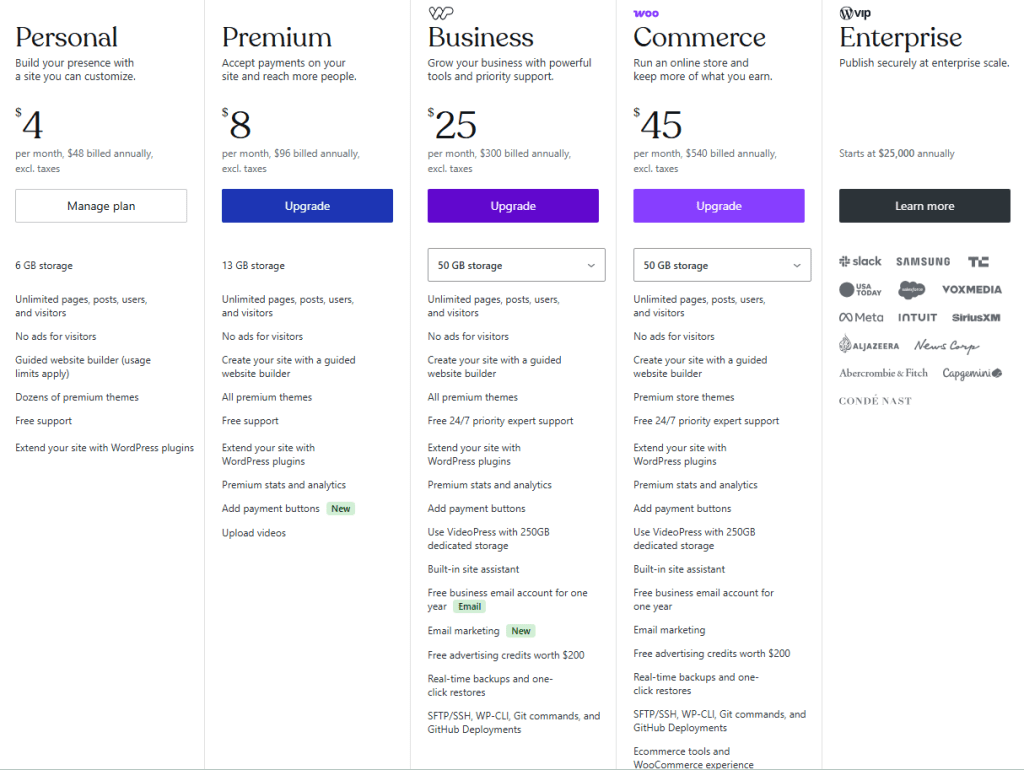
You can absolutely start a blog for free. Most platforms have free versions that offer the basic tools you’ll need. However, you often may need to upgrade to a paid site if you want to allow ads, more customization options, plugin ability, etc.
WordPress.com does have a basic free account option, but it comes with limitations like you’re not able to run third-party ads or sell anything through it and it would have a “.wordpress.com” extension.
Best websites to use for blogging
A blogging platform is the host site where your blog will exist as a living document. This is where you’ll create an account and make and edit your blog posts.
WordPress.com is kind of the “industry standard” and is what I use, but there are many others. Which platform you choose depends on what you’re looking to do.
WordPress, Blogger and Medium are all blogging websites meaning they’re more geared towards blogging. Since I use WordPress for this blog, I’ll be speaking for it – I can’t say for certain how other sites are. But with WordPress, once you create your account, it’s pretty straightforward and you can create a home page and as many other “pages” as you’d like (so think “About Me,” “Shop,” “Testimonials,” etc) as well as however many blog posts you’d like. Essentially you’re still creating a website but it’s a more simplified version.
However, some people prefer to create a website (which can be done easily through a platform like Wix or Squarespace) and input blog posts on there, though it’s not necessarily geared towards blogging like WordPress is. However you’re able to customize your website and can still give it that blog feel. You also may choose to use a website if your blog isn’t the main focal point of your online business but rather a supplement to it.
Substack is another common free choice for bloggers these days. It’s very easy to use, as its less “create a blog/website” than just simple writing and posting. It allows you to easily write and publish simple blog articles with a limited range of customization. It also sends them to your subscribers as a sort of email newsletter.
Pros and Cons of blogging to make money online

Blogging can absolutely be a lucrative way to make money online but I wouldn’t say it’s “simple” – especially not at first.
You need to really build credibility and trust with your readers. This can be done by offering freebies that provide value and solve a problem for them; by detailing your credentials, knowledge and expertise in the subject area; by engaging with them, answering comments and questions publicly so that other readers know you’re a real human who wants to help them; by offering a variety of tools and resources that can help them; by showing up consistently and as frequently as possible; and – most importantly – by not constantly trying to sell to them. Readers can tell when they’re just being sold to over and over, and it’s a huge turn off.
That being said, making money through a blog requires dedication and a solid foundation with your audience. But once you get a good amount of subscribers and you’ve figured out how to use SEO and other tools to your advantage so your content is continually being shown to new readers, there is definitely money to be made.
Pros of making money with a blog:
- You can monetize in multiple different ways
- You are working on your own timeline and schedule (unless you have a paid partnership or brand deal that requires a set schedule, has deadlines, etc)
- You’re writing about things you’re genuinely interested in and knowledgeable about
- Low to zero startup cost
- Ability to build multiple passive income streams over time
Cons of making money online with a blog:
- Can be very time intensive
- Can require a lot of editing, especially as you learn SEO and blogging techniques
- Requires consistent creation and posting to keep your content in front of new eyes
- Can take a long time to start seeing real income
- Highly competitive and saturated, depending on your niche
- Audience has short attention spans: you may put in hours of time on one post for someone to scan it for 2 seconds
- Technical issues may often arise
- AI is becoming the preferred “quick answer” tool in online searches meaning your blog may have even less of a chance at standing out
Tips for successful blogging
Here are a few tips I’ve learned on how to have a successful blog:
- Save drafts often
- Don’t get too caught up in aesthetics and design at first
- Have a simple title that sticks
- Maintain consistent formatting
- Give your readers a way to contact you
- Have a “subscribe” option on every page/post
- Pay more for a “.com” name
- Have a good flow
- Link to your other posts often
- Use strong SEO
- Use headings and subheadings strategically
- Keep your posts & pages well-organized
- Keep a list of links, photos, reviews etc. you’ll need to add in down the line
- Offer a freebie or lead magnet to gain subscribers
At the end of the day
there are ample ways to make money online with a blog. However, it’s not a “get rich quick” thing, nor is it going to be the easiest route you can take. But it does show that you have grit, tenacity, and a willingness to show up consistently to help others. Blogging is actually a very selfless way to earn money online because it requires a tremendous amount of effort and patience, and if you’re not constantly showing up in an effort to help solve someone’s problem, you’re not going to reap the rewards.
Want more insight and resources on ways to make money online? Subscribe below to get notified when my next post goes live – I’m hoping to put one out every week for you!
I hope this was helpful! Please let me know in the comments if there is any other information that would be helpful for you. I’d be happy to add onto this!





Leave a comment